Intro
In my previous post, Half Baked Images I walked through building hardened AMIs using Amazon EC2 Image Builder, automating the pipeline, and wiring it into Launch Templates for Auto Scaling Groups. I touched on some aspects that felt almost, but not quite useful. In this post I’ll talk about my attempts to keep on top of the images produced and why (spoiler!) I ultimately chose Lambda over built-in Image Builder functionality.
Task: Stop AMIs and snapshots from piling up
AWS has an answer for that, of course: Image Builder lifecycle policies.
This should be easy (AKA Foreshadowing).
When asked “What does Lifecycle management in Image Builder do?”, Amazon Q gave this answer:
“The lifecycle manager implements automated rules to manage your image resources throughout their lifecycle, helping ensure image freshness while minimizing costs for underlying infrastructure like snapshot storage for AMIs or ECR repository storage for container images.”
I understand all those words so this is going to be easy peasy.
Lifecycle management made… confusing.
What I didn’t anticipate was how surprisingly awkward it would be to implement what felt like a very simple solution.
Unfortunately, the behaviour of those policies was less intuitive than the name suggested… to me at least.
This post is about the assumptions I made, why they were wrong, what Image Builder lifecycle actually does, and why I ultimately replaced it with a small Lambda function that behaved better for my use case.
Initial approach
I started with a simple goal:
Retain the last 5 AMIs produced by Image Builder.
Delete anything older, including associated snapshots.
Image Builder has a native lifecycle feature. Terraform exposes it cleanly. This felt so obvious that I didn’t question it. The console UI even said things like:
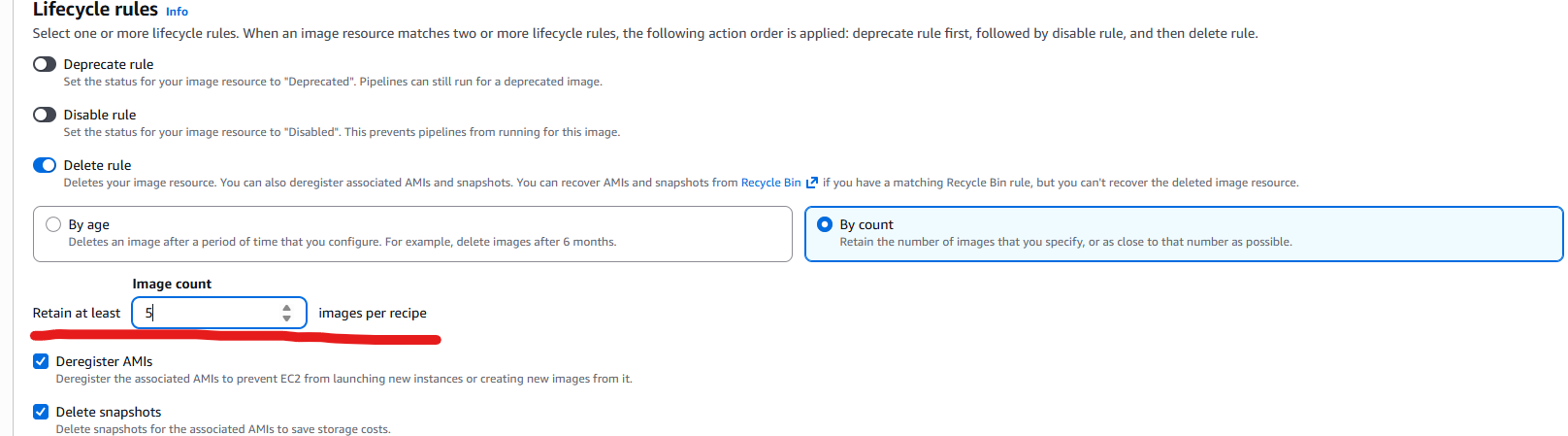
So I configured a lifecycle policy in terraform like this:
resource "aws_imagebuilder_lifecycle_policy" "retain_5_images" {
  name           = "${var.project}-lifecycle-policy"
  description    = "Retain only the 5 most recent AMIs created by Image Builder"
  execution_role = aws_iam_role.imagebuilder_role.arn

  resource_type = "AMI_IMAGE"

  resource_selection {
    tag_map = {
      Project   = var.project
      ManagedBy = "AWSImageBuilder"
    }
  }

  policy_detail {
    action {
      type = "DELETE"
      include_resources {
        amis       = true
        containers = false
        snapshots  = true
      }
    }

    filter {
      type  = "COUNT" # or "COUNT"
      value = "5"
    }
  }
}
Note: This wasn’t my first attempt, this was the first that ran correctly.
It took me a week to get it to run. See Assumption #1.
Even now, recovering from the savage AMI cull of ‘25, I still read that code and think the policy should:
- Take the
DELETEaction for resources type “AMI_IMAGE”… - also including resource types AMIs and snapshots, for those AMI_IMAGEs that matched…
- tags
Project&ManagedBy, whilst retaining… - Filter: COUNT = 5
Therefore I expected the outcome to be:
Find Images were
Project = var.projectandManagedBy = "AWSImageBuilder"
If there are ≤5 images that match that criteria → delete nothing
If there are 6 → delete the oldest 1
If there are 18 → delete the oldest 13
etc. Simple. Predictable. Safe.
That is not what happened.
But what went wrong?
Assumption is the mother of all… fowl ups.
Assumption #1
My first assumption was that I would have some control over when the lifecycle management would run. Similar to controlling the pipeline schedule, I’d be able to control a lifecycle management schedule.
e.g. I’d be able to define a cron schedule or trigger it to run immediately after a new image became AVAILABLE. Nope.
Image Builder Lifecycle policies run on an internal AWS schedule, completely decoupled from the triggers or control I expected. There is also no “Run now” button to force an evaluation.
This had two consequences that significantly impacted my use case:
Testing is non-linear.
Unsurprisingly my lifecycle didn’t work on the first try. So, when I attempted to fix it, I had to wait 24 hours to see if that had worked.
Testing, that could have taken a couple of hours, took days to work through as a result of this approach.Troubleshooting was complex and misleading
I was working on a few aspects of the code simultaneously, so by the time my lifecycle ran each day I had usually made several changes.- Tags had been added or changed
- IAM permissions were tightened
- Images components were changing, meaning recipes had been updated.
The combination of those two realities made it very difficult to figure out cause and effect: Was lifecycle management failing because I’d borked the config? Was it related to my tagging changes? or the new recipe?
sigh.
Assumption #2
My second assumption was that the lifecycle policy in Image Builder relates to the images built by Image Builder… that is to say - the AMIs.
Sensible assumption? I thought so… and if you did too… join me in my pit of despair because, as we’ll get to in a moment, this was not the case.
Assumption #3
My third, and what proved to be my most costly assumption, was that I’d provided enough details to safely identify the images to be deleted and that only those Images would be deleted. That this turned out to be incorrect was the real sore point - this one wasn’t easy to predict or see coming until it went wrong.
So what actually happened?
When my lifecycle policy ran, it removed all AMIs. Everything.
Including AMIs still in use by my Auto Scaling Group’s Launch Template.
Nothing useful remained. Zero AMIs, zero snapshots.
Thankfully this occurred in a lab environment so wasn’t too impactful… but it did give me chills. I looked over the code, at the resources, and the lifecycle policy in the console, etc. It all looked correct. It seemed to make sense - but here I was with no useable images left.
And at the moment of discovering this issue, even from that point, it took a good few hours to understand why it had gone so badly wrong.
To say I was a bit surprised at the outcome is putting it mildly.
This could not be allowed to happen in an environment that matters to me.
Where did the assumptions fall down?
Not having control over the scheduling of the lifecycle policy was simultaneously a relatively minor issue and almost enough to be a deal breaker on its own. Who’s happy waiting 24 hours to test configuration changes in a lab? Fail fast isn’t an option, if you have to wait 24 hours to test each change.
My assumption that my lifecycle policy was targeting my AMI’s directly was incorrect. This one really mattered.
EC2 Image Builder Lifecycle Policies target Image builder resources, e.g. things with arns likearn:aws:imagebuilder:eu-west-2:123456789012:image/custom-linux-build/1.0.6/3.
This is a subtle but important distinction to understand when you’re thinking about how Image Builder Lifecycle policies identify targets. You can, as I did in the code above, state that it should includeamis = true&snapshots = true. But, again, the AMIs and snapshots are secondary in this.Assuming I’d provided the correct selection criteria was compounded by the previous assumption about what the lifecycle policies target.
I mentioned that after my lifecycle policy ran I had zero AMI’s and zero snapshots.
But I did still have 5 “images”. I still had 5 Image Builder Image’s retained. Although the AMI’s that they pointed to were gone.
Yup, I swore inwardly at this point.
Bringing it home
I asked Amazon Q why it would do this (to me), and in its reply it had this little unhelpful truth bomb:
“Even if the Image Builder Image resources were retained, if your policy had:
"includeResources": { "amis": true, "snapshots": true }This would delete the underlying AMIs and snapshots while potentially keeping the Image Builder metadata.”
I swore outwardly at this point. Loudly.
This ia an awful failure condition by any stretch. I accept that this was my configuration, and I am responsible for this, it still feels like this was a booby trap waiting to go off rather than something you could reasonably foresee & avoid.
So what did I do about it
After a fair amount of frustration, confusion, and lost AMIs I decided to abandon the Image Builder lifecycle policy approach and turned to AWS Lambda - what can’t Lambda fix?
I created a small function that I deployed using Terraform, as follows:
import os
import json
import boto3
import logging
from datetime import datetime, timezone

logger = logging.getLogger()
logger.setLevel(logging.INFO)

ec2 = boto3.client("ec2")

RETAIN_COUNT = int(os.getenv("RETAIN_COUNT", "5"))
PROJECT_TAG_VALUE = os.getenv("PROJECT_TAG_VALUE", "labpoc")
MANAGED_BY_VALUE = os.getenv("MANAGED_BY_VALUE", "AWSImageBuilder")
LAUNCH_TEMPLATE_ID = os.getenv("LAUNCH_TEMPLATE_ID")  # required for protection
DRY_RUN = os.getenv("DRY_RUN", "true").lower() == "true"


def _parse_dt(s: str) -> datetime:
    return datetime.fromisoformat(s.replace("Z", "+00:00")).astimezone(timezone.utc)


def _list_matching_amis():
    filters = [
        {"Name": "tag:Project", "Values": [PROJECT_TAG_VALUE]},
        {"Name": "tag:ManagedBy", "Values": [MANAGED_BY_VALUE]},
        {"Name": "state", "Values": ["available"]},
    ]
    resp = ec2.describe_images(Owners=["self"], Filters=filters)
    images = resp.get("Images", [])
    images.sort(key=lambda i: _parse_dt(i["CreationDate"]), reverse=True)  # newest first
    return images


def _snapshots_for_ami(image: dict) -> list[str]:
    snaps = []
    for bdm in image.get("BlockDeviceMappings", []):
        ebs = bdm.get("Ebs")
        if ebs and ebs.get("SnapshotId"):
            snaps.append(ebs["SnapshotId"])
    return snaps


def _summarise_images(images: list[dict], max_items: int = 50) -> list[dict]:
    out = []
    for img in images[:max_items]:
        out.append({
            "ImageId": img.get("ImageId"),
            "CreationDate": img.get("CreationDate"),
            "Name": img.get("Name"),
        })
    if len(images) > max_items:
        out.append({"note": f"truncated: showing {max_items} of {len(images)}"})
    return out


def _amis_referenced_by_latest_lt_versions(launch_template_id: str, protect_versions: int) -> set[str]:
    """
    Protect AMIs referenced by the *latest N* launch template versions.
    """
    protected = set()

    # Fetch versions (we'll sort and take the latest N)
    versions = []
    paginator = ec2.get_paginator("describe_launch_template_versions")
    for page in paginator.paginate(LaunchTemplateId=launch_template_id):
        versions.extend(page.get("LaunchTemplateVersions", []))

    if not versions:
        return protected

    # Sort by VersionNumber descending and take latest N
    versions.sort(key=lambda v: v.get("VersionNumber", 0), reverse=True)
    latest = versions[:protect_versions]

    for v in latest:
        data = v.get("LaunchTemplateData", {})
        image_id = data.get("ImageId")
        if image_id:
            protected.add(image_id)

    return protected


def lambda_handler(event, context):
    logger.info(
        "Starting AMI retention. retain=%s project=%s managedby=%s dry_run=%s lt_id=%s",
        RETAIN_COUNT, PROJECT_TAG_VALUE, MANAGED_BY_VALUE, DRY_RUN, LAUNCH_TEMPLATE_ID
    )

    if RETAIN_COUNT < 1:
        raise ValueError("RETAIN_COUNT must be >= 1")

    images = _list_matching_amis()
    total = len(images)
    logger.info("Found %s matching AMIs.", total)
    logger.info("Matched AMIs (newest->oldest): %s", json.dumps(_summarise_images(images)))


    if total <= RETAIN_COUNT:
        logger.info("<= %s matching AMIs; deleting none.", RETAIN_COUNT)
        return {"statusCode": 200, "body": json.dumps({"matching": total, "deleted": 0})}

    protected = set()
    if LAUNCH_TEMPLATE_ID:
        protected = _amis_referenced_by_latest_lt_versions(LAUNCH_TEMPLATE_ID, RETAIN_COUNT)
        logger.info("Protected AMIs referenced by latest %s Launch Template versions: %s",
                RETAIN_COUNT, list(sorted(protected)))
    else:
        logger.warning("LAUNCH_TEMPLATE_ID not set; NOT protecting in-use AMIs (not recommended).")

    # Keep newest RETAIN_COUNT (always)
    keep_newest = {img["ImageId"] for img in images[:RETAIN_COUNT]}

    # Eligible = older than newest RETAIN_COUNT AND not protected by LT
    older = images[RETAIN_COUNT:]
    candidates = []
    for img in older:
        ami_id = img["ImageId"]
        if ami_id in protected:
            continue
        candidates.append(img)

    logger.info("Candidates for deletion (older than newest %s, not referenced by LT): %s",
                RETAIN_COUNT, len(candidates))

    deleted = []
    for img in candidates:
        ami_id = img["ImageId"]
        snaps = _snapshots_for_ami(img)

        logger.info("Deleting AMI %s (snapshots=%s)", ami_id, snaps)

        if not DRY_RUN:
            ec2.deregister_image(ImageId=ami_id)
            for snap_id in snaps:
                ec2.delete_snapshot(SnapshotId=snap_id)

        deleted.append({"ami": ami_id, "snapshots": snaps})

    logger.info("Done. Deleted %s AMIs.", len(deleted))
    return {"statusCode": 200, "body": json.dumps({"matching": total, "deleted": len(deleted), "items": deleted})}
Note: the environment vars, you can set these in terraform when you specify your aws_lambda_function
  environment {
    variables = {
      RETAIN_COUNT       = tostring(var.ami_retain_count)
      PROJECT_TAG_VALUE  = var.project
      MANAGED_BY_VALUE   = "AWSImageBuilder"
      DRY_RUN            = "true" # flip to false when confident it's working
      LAUNCH_TEMPLATE_ID = aws_launch_template.wafr_lt.id
    }
  }
This Lambda function is, in many ways, much simpler than what I thought I’d been doing with the Image Builder Lifecycle Manager… This function:
- Lists AMIs by tag (Project, ManagedBy)
- Sorts them by creation date
- Keeps the newest N (defined by Terraform variable
ami_retain_count) - Deregisters anything older
- Deletes the snapshots referenced by those AMIs
- Never deletes AMIs currently referenced by the latest N Launch Template (also defined by
ami_retain_count.)
This runs on a schedule I control. And understand!
It’s observable, repeatable, and it can be run in dry-run mode while testing.
Most importantly, the behaviour can be explained in one sentence:
“We keep the 5 newest AMIs for this project, and we never delete one that’s in use.”
That is the rule I thought I was configuring when I attempted to enable lifecycle retention — but now it’s actually true!
Why a custom solution won (& why I’m okay with that)
After working through this in detail, I came to a conclusion that surprised me:
Image Builder lifecycle policies are not a good fit for intuitive AMI retention.
They are:
- metadata-centric
- recipe-scoped
- on their own schedule
- capable of deleting artifacts without leaving usable AMIs behind (talk about sharp edges!)
This doesn’t mean lifecycle policies are broken — but it does make them dangerous if your mental model is “Keep the last N usable AMIs.”
In my experience this model doesn’t map cleanly to how Image Builder lifecycle works.
By contrast my Lambda function is:
- explicit - I could set my own boundaries that did what I expected them to do.
- controlled - it runs when i want.
- able to add clear and simple guardrails - e.g. don’t delete any AMIs still in use, regardless of other filters.
- Auditable - see what’s going on easily in the execution logs.
- Test friendly. Flip “dry-run” to ’true’ to test what would be deleted before you take the training wheels off.
The result was a solution that worked as I expected, trimmed my AMIs and Snapshots to the number I wanted, and stopped my bill from growing forever with the ghost of a million unused snapshots, allowed me to safely test changes when I wanted. And it only cost only a tiny amount in Lambda usage. Worth it.
Final thoughts
EC2 Image Builder is excellent at building & customising images.
EventBridge and Lambda are excellent at reacting to them.
But AMI retention is an operational concern, not a build concern — and once I treated it that way, the solution became simpler, safer, and easier to understand.
If you’re currently using Image Builder lifecycle today and it works for you, that’s great.
If, however, your mental model is “keep the last N usable AMIs”, it’s worth pausing and double-checking that the system is actually doing what you think it is.
Sometimes the most robust solution is the one you can explain easily — and without waiting 24 hours to see what it decided to do.
Additional Resources
- Complete EC2 Image Builder with Lifecycle Management Example
- Amazon EC2 Image Builder
- AWS Lambda
- Half Baked Images - previous blog post
This post is part of my AWS technical blog series. Found this helpful? Connect with me on LinkedIn or check back here for more AWS content and discussions.